
A blog post template gives you a ready-made structure for writing an article without starting from scratch. Instead of wondering what to write next, you can focus on sharing useful information with your readers.
Whether you’re writing a tutorial, review, or personal story, these 10 simple templates will help you organize your ideas and create better blog posts.
Just copy the structure you need, replace the placeholders, and start writing.
Key Takeaways
- Blog post templates help you organize content and write more efficiently.
- Different formats work for tutorials, lists, reviews, and personal stories.
- A good post starts with a clear title and introduction.
- Templates are starting points, so adapt them to your topic and audience.
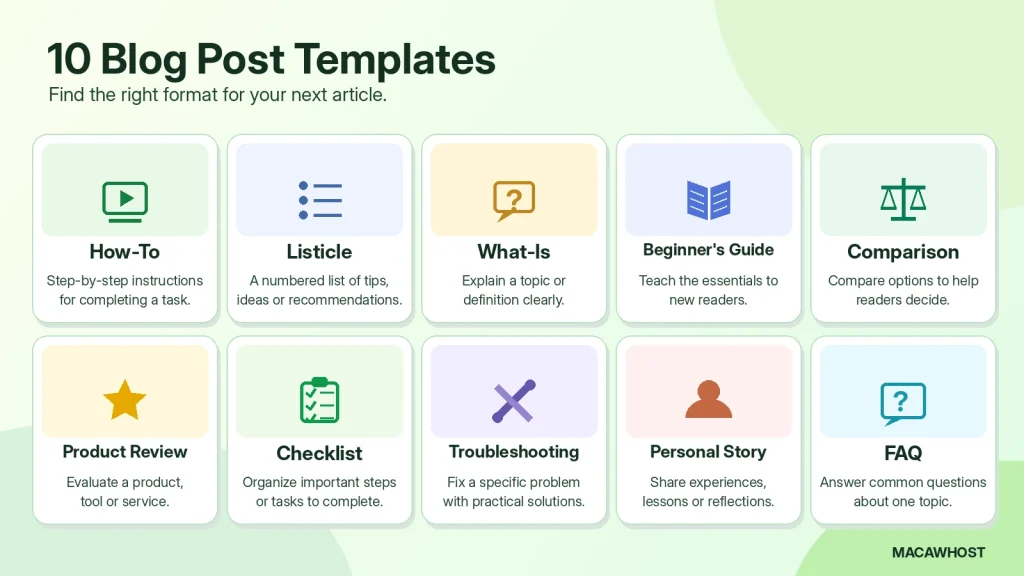
10 Blog Post Templates You Can Copy
Each template includes an example title and a simple outline you can follow.
1. How-To Blog Post Template
Best for: Tutorials and step-by-step instructions.
How-to posts help readers complete a specific task. They’re especially useful for technology, cooking, DIY, and educational blogs.
Example title: How to Start a Food Blog in 5 Steps
Copy this structure:
- Title: How to [Achieve a Goal] in [Number] Steps
- Introduction: Explain what readers will accomplish.
- Before You Start: List any tools or requirements.
- Step 1: [First action]
- Step 2: [Second action]
- Step 3: [Third action]
- Conclusion: Explain how to check the result and what to do next.
Tip: Keep instructions clear and include screenshots when they help explain a step.
2. Listicle Blog Post Template
Best for: Tips, ideas, recommendations, and collections.
Listicles organize information into numbered sections, making them easy to scan.
Example title: 10 Easy Breakfast Ideas for Busy Mornings
Copy this structure:
- Title: [Number] Best [Topic] for [Audience]
- Introduction: Explain what the list covers.
- Item 1: [Name + useful explanation]
- Item 2: [Name + useful explanation]
- Item 3: [Name + useful explanation]
- Conclusion: Highlight the most useful options or suggest a next step.
Each item should offer something genuinely helpful, not just repeat the heading.
3. What-Is Blog Post Template
Best for: Explaining terms and answering beginner questions.
This format works well for educational articles because it answers a specific question immediately.
Example title: What Is Web Hosting? A Simple Beginner’s Guide
Copy this structure:
- Title: What Is [Topic]? Definition and Examples
- Introduction: Define the topic in plain language.
- How It Works: Explain the basic concept.
- Examples: Show how it’s used in real situations.
- Why It Matters: Explain its practical value.
- Conclusion: Summarize the main takeaway.
For a real example, see our article explaining what a blog post is.
4. Beginner’s Guide Template
Best for: Introducing a broad topic to readers with little experience.
A beginner’s guide takes readers from basic concepts to practical first steps.
Example title: Photography for Beginners: Getting Started
Copy this structure:
- Title: [Topic] for Beginners: How to Get Started
- Introduction: Explain what readers will learn.
- The Basics: Introduce important terms.
- What You Need: List essential tools or requirements.
- Getting Started: Explain the first practical steps.
- Common Mistakes: Share mistakes worth avoiding.
- Conclusion: Suggest what readers should learn next.
Avoid overwhelming beginners with advanced terminology.
5. Comparison Blog Post Template
Best for: Helping readers choose between products, tools, or services.
Comparison articles should explain the important differences fairly rather than simply declare a winner.
Example title: WordPress vs Wix: Which Is Better for Beginners?
Copy this structure:
- Title: [Option A] vs [Option B]: Which Should You Choose?
- Introduction: Explain the main difference.
- Option A: Features, benefits, and limitations.
- Option B: Features, benefits, and limitations.
- Side-by-Side Comparison: Compare important factors.
- Which Should You Choose?: Recommend each option for suitable use cases.
Use accurate, up-to-date information when comparing prices and features.
6. Product Review Template
Best for: Software, gadgets, tools, and services.
A useful review explains what a product does, who it’s for, and where it falls short.
Example title: [Product Name] Review: Features, Pros, and Cons
Copy this structure:
- Introduction: Introduce the product and its purpose.
- Key Features: Explain the most important features.
- Pros: Highlight genuine advantages.
- Cons: Discuss limitations.
- Pricing: Include accurate pricing where relevant.
- Final Verdict: Explain who might benefit from it.
Important: Don’t claim you’ve personally tested a product unless you actually have.
7. Checklist Blog Post Template
Best for: Tasks that involve multiple steps or preparation.
A checklist makes it easy for readers to track progress and avoid missing important actions.
Example title: Website Migration Checklist: How to Move Hosts Safely
Copy this structure:
- Title: [Task] Checklist: Everything You Need to Know
- Introduction: Explain why preparation matters.
- Before: List preparation tasks.
- During: Explain the actions to complete.
- After: Include final checks.
- Conclusion: Remind readers of the most important precautions.
For inspiration, see our website migration checklist.
8. Troubleshooting Blog Post Template
Best for: Fixing technical problems or solving common issues.
Troubleshooting posts work best when readers can quickly identify their problem and follow the relevant solution.
Example title: WordPress Website Not Loading? 5 Fixes to Try
Copy this structure:
- Title: [Problem]? Here’s How to Fix It
- Introduction: Describe the problem briefly.
- Common Causes: Explain what might be wrong.
- Fix 1: [First solution]
- Fix 2: [Second solution]
- Fix 3: [Third solution]
- When to Get Help: Explain when expert assistance is needed.
Start with simple, low-risk fixes before suggesting changes that could affect website data.
9. Personal Story Blog Post Template
Best for: Experiences, lessons learned, and personal blogging.
Personal stories help readers connect with the writer and learn from real experiences.
Example title: What I Learned From My First Year of Blogging
Copy this structure:
- Title: What I Learned From [Experience]
- Introduction: Explain why you started.
- The Beginning: Describe your initial experience.
- Challenges: Share what went wrong or surprised you.
- Lessons Learned: Explain your main takeaways.
- Conclusion: Share what you’d do differently.
Be specific and authentic. Real experiences are more valuable than exaggerated success stories.
10. FAQ Blog Post Template
Best for: Answering several related questions about one topic.
FAQ-style posts are useful when readers need quick, straightforward answers.
Example title: 10 Common Questions About Starting a Blog
Copy this structure:
- Title: [Number] Common Questions About [Topic]
- Introduction: Explain who the article is for.
- Question 1: [Question + direct answer]
- Question 2: [Question + direct answer]
- Question 3: [Question + direct answer]
- Conclusion: Summarize the most important points.
Choose questions your audience actually asks. Don’t add unnecessary questions simply to make the article longer.
How to Choose the Right Template
The best blog post template depends on what your readers want to accomplish.
If they want to learn a task, choose a how-to guide. If they’re comparing products, use a comparison template. For simple questions, a definition or FAQ format may be enough.
Before writing, ask yourself:
- What question is the reader trying to answer?
- Which format makes the answer easiest to understand?
- What examples or details would make the article more useful?
Don’t force every topic into the same format. Choose the structure that fits the content.
Tips for Writing Better Blog Posts
A template provides structure, but your content still needs to deliver value.
Keep these tips in mind:
- Answer the main question early. Don’t make readers search for the information they need.
- Use clear headings. Help visitors navigate your article quickly.
- Write naturally. Avoid complicated language and unnecessary repetition.
- Add useful examples. Show readers how to apply your advice.
- Proofread before publishing. Check accuracy, grammar, links, and formatting.
If you’re new to publishing articles, our blogging for beginners guide walks you through setting up a blog and creating your first post.
Still setting up your blog? Explore our 100 creative blog name ideas to find a memorable name that matches your topic and personality.
Start Writing Your Next Blog Post
The right blog post template can make writing easier, especially when you’re just starting out.
Choose one of these 10 formats, replace the placeholders with your own information, and build your article around what readers genuinely want to know.
You don’t need a complicated structure or lengthy introduction. Focus on clear explanations, useful examples, and content that answers the reader’s question.