
Blogging for beginners is easier than you might think. You don’t need coding skills, expensive tools, or years of writing experience to start a blog.
All you need is a topic, a blogging platform, and something useful to share. In this guide, you’ll learn how to start your first blog in 2026, from choosing a name to publishing your first post.
Key Takeaways
- Choose a blog topic you enjoy and that people want to read about.
- WordPress is a flexible platform for starting and managing a blog.
- You’ll need a domain name and hosting for a self-hosted blog.
- Focus on helpful content and consistency rather than quick results.
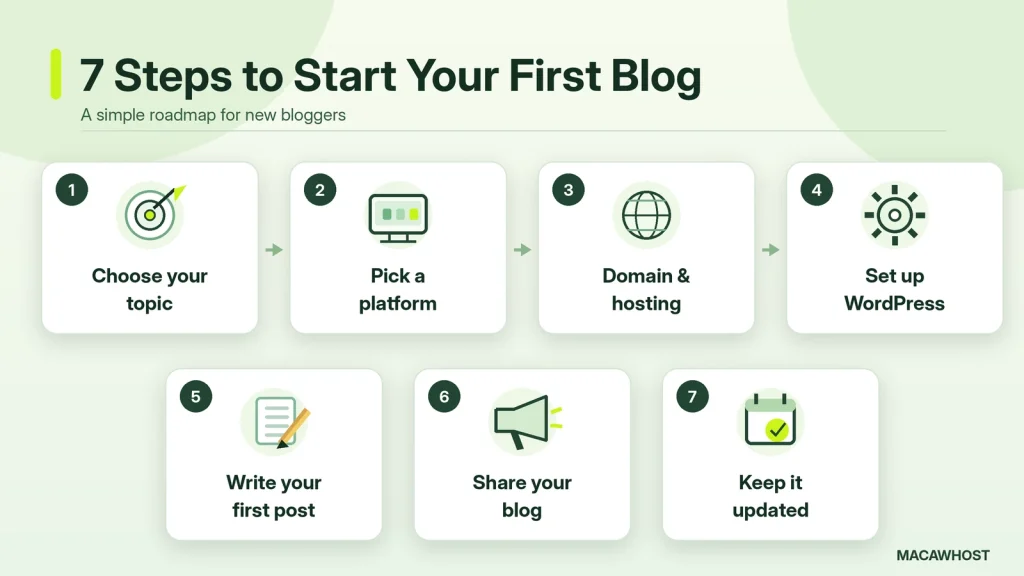
Blogging for Beginners: 7 Steps to Get Started
Starting a blog involves a few simple decisions. Follow these steps to get your website online and publish your first article.
1. Choose Your Blog Topic
Start by deciding what you want to write about. This is often called your blog niche.
Popular blogging topics include:
- Technology and gadgets
- Food and cooking
- Travel and lifestyle
- Personal finance
- Health and fitness
- Business and marketing
Choose something you’re interested in and can write about regularly.
Tip: Be specific. Instead of starting a general food blog, you could focus on quick, affordable meals for busy families.
Before moving forward, think of at least five article ideas for your chosen topic.
2. Pick a Blogging Platform
A blogging platform lets you create, publish, and manage articles without building a website from scratch.
Some popular options include WordPress, Blogger, and Wix.
For beginners who want flexibility and room to grow, WordPress.org (self-hosted WordPress) is a strong choice.
It offers:
- Thousands of free themes
- Plugins for additional features
- Control over your website and content
- Options to expand your blog later
WordPress software is free, but running a self-hosted WordPress blog requires hosting.
If you prefer a simpler starting point, hosted blogging platforms handle much of the technical setup, although their free plans may have limitations.
3. Choose a Domain Name and Web Hosting
Your domain name is your blog’s address—for example, mytravelblog.com.
Choose a short, memorable, easy-to-spell name. Avoid unnecessary numbers and hyphens.
If you’re unfamiliar with domains, read our guide on what a domain name is.
Next, you’ll need web hosting to make your blog accessible online.
When comparing hosting providers, look for:
- WordPress installation support
- SSL certificates for HTTPS
- Reliable performance and support
- Backup and security features
- Clear pricing and renewal terms
Our beginner’s guide to what web hosting is explains how hosting works.
Once you have a domain and hosting, you’re ready to build your blog.
4. Install WordPress and Customize Your Blog
Many hosting providers offer one-click WordPress installation through their control panel.
After installing WordPress, access your dashboard at yourdomain.com/wp-admin.
Start with these basic settings:
- Go to Settings → General to update your site title and tagline.
- Open Appearance → Themes and choose a mobile-friendly theme.
- Go to Settings → Permalinks and select Post name for clean URLs.
- Create essential pages such as About and Contact.
- Confirm your website loads securely using HTTPS.
You don’t need an expensive theme or lots of plugins to start. A clean, simple design is enough.
Tip: Set your permalink structure before publishing articles. Changing URLs later can create broken links.
5. Write and Publish Your First Blog Post
Now comes the interesting part: creating content.
Start with a question your audience might ask and write a helpful answer.
For example, if your blog focuses on cooking, your first article could be “5 Easy Breakfast Ideas for Busy Mornings.”
To publish your first WordPress post:
- Go to Posts → Add New Post.
- Enter a clear, descriptive title.
- Write your article using headings and short paragraphs.
- Add relevant images and internal links where useful.
- Choose a category and preview your post.
- Click Publish when everything looks right.
Not sure how to structure a blog article? Read our guide on what a blog post is, with examples and common formats.
Remember, your first article doesn’t need to be perfect. Make it useful, proofread it, and improve it over time.
6. Help People Discover Your Blog
Publishing articles is only the beginning. You also need to help readers find them.
Start with these simple practices:
- Use SEO: Include relevant keywords naturally in titles, headings, and content.
- Share your posts: Promote articles on social platforms where your audience spends time.
- Link related articles: Help visitors discover more of your content.
- Use Google Search Console: Monitor how your blog appears in Google Search.
- Connect with readers: Respond to genuine questions and comments.
Avoid expecting instant traffic. Building an audience takes time, and search rankings aren’t guaranteed.
7. Keep Your Blog Updated
Consistency matters more than publishing every day.
Choose a realistic schedule, whether that’s one post per week or a few articles each month.
As your blog grows:
- Update older articles when information changes.
- Keep WordPress, themes, and plugins updated.
- Back up your website regularly.
- Review which topics attract readers.
- Plan future posts around your audience’s questions.
The goal is to build a useful collection of articles rather than publish content simply to fill your website.
How Much Does It Cost to Start a Blog?
You can start with a free hosted blogging platform, but a self-hosted blog usually has some costs.
| Expense | What to Expect |
|---|---|
| Domain name | Usually an annual registration fee |
| Web hosting | Monthly or annual subscription |
| WordPress software | Free |
| Themes | Free or optional paid themes |
| Plugins | Free options and optional paid upgrades |
You don’t need premium tools when you’re starting. A basic hosting plan, a free theme, and essential plugins are enough for many beginner blogs.
Can You Make Money From Blogging?
Yes, blogging can generate income, but it usually takes time to build an audience and earn readers’ trust.
Common monetization methods include advertising, affiliate marketing, sponsored content, and selling products or services.
Focus first on publishing useful articles and understanding your readers. There’s no guaranteed income from blogging, especially in the early stages.
Ready to Start Your First Blog?
Blogging for beginners doesn’t need to be complicated. Choose a topic, set up your website, publish your first article, and keep learning as you go.
If you’re planning to use WordPress, MacawHost WordPress Hosting offers one-click installation, free SSL, automatic daily backups, and cPanel access to help you get started.
The most important step is publishing your first useful article. You can improve everything else as your blog grows.