
KVM VPS hosting uses Kernel-based Virtual Machine technology to create isolated virtual servers on a physical Linux host. Each virtual machine can run its own operating-system kernel, applications, and server configuration. KVM is a popular foundation for Linux and Windows virtual servers because it provides hardware-assisted virtualization and flexible resource management.
Understanding how KVM works makes it easier to judge VPS features without confusing virtual resource allocations with ownership of physical hardware.
Key Takeaways
- KVM is a virtualization technology built into Linux that enables independent guest operating systems.
- A KVM VPS has allocated virtual CPU, memory, storage, and networking; assigned vCPUs are not necessarily exclusive physical cores.
- Full operating-system control is useful for custom applications, but unmanaged servers require active maintenance.
- Check provider resource policies, backups, support, and disk performance rather than choosing a VPS based on virtualization alone.
How Does KVM VPS Hosting Work?
A Linux server uses the KVM kernel modules with hardware virtualization support to run virtual machines. A virtual machine monitor, often QEMU, provides virtual hardware devices, while a management layer provisions and monitors the guests. Every guest has its own operating-system environment and runs applications without sharing a single host-user-space installation.
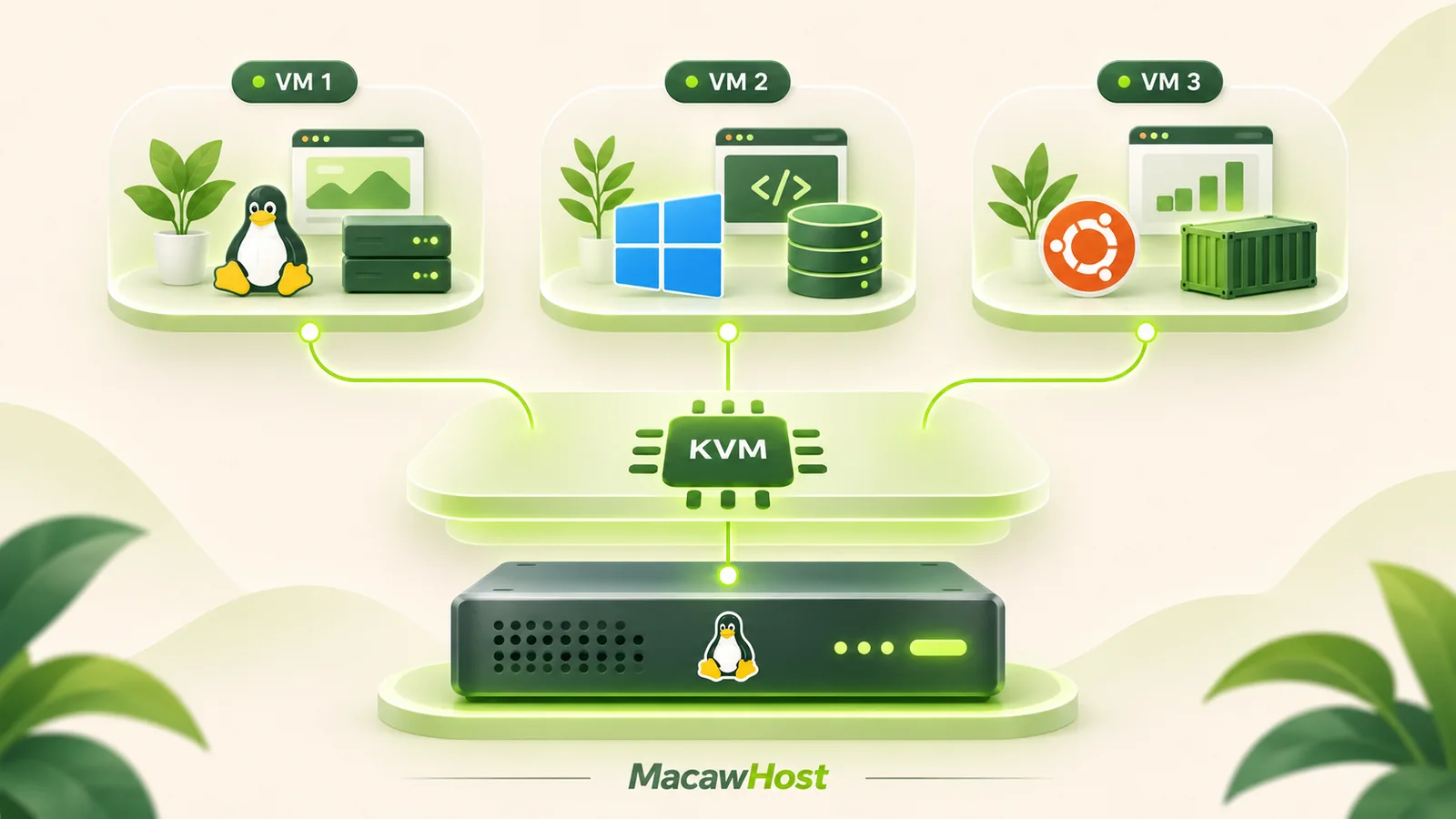
Imagine one physical server hosting three virtual machines: one runs a website, another handles a database, and a third is used for software testing. Each has its own filesystems, networking settings, and login accounts. This separation reduces routine interference, but all three still depend on the host’s actual hardware and security.
What Are the Advantages of a KVM VPS?
Independent Operating Systems
KVM can support different Linux distributions and compatible Windows guests. Each virtual machine boots its own kernel, unlike operating-system-level containers that normally share a kernel. This is valuable when software requires a particular OS, kernel features, or administrative privileges.
Flexible Server Administration
Unmanaged KVM VPS plans often provide root or administrator access. You can install web servers, databases, application runtimes, and monitoring tools, and configure firewall rules. The exact access level still depends on your provider’s plan and policies.
Workload Isolation
Virtual machines have distinct memory and operating-system contexts. Isolation can reduce the impact of ordinary software faults between guests. However, hypervisor vulnerabilities, shared network bottlenecks, and physical hardware failures remain possible. A KVM VPS is not an automatic security guarantee.
Predictable Resource Planning
Plans typically specify virtual CPU counts, RAM, disk capacity, and network limits. Memory may be reserved or otherwise managed depending on the host configuration. CPU time, storage throughput, and network capacity can be shared, so real-world consistency depends on the provider’s provisioning policy and the workload.
What Are the Limitations of KVM VPS Hosting?
- Management responsibility: Operating-system updates, services, user access, and backups may be your responsibility.
- Shared infrastructure: Virtual machines can compete for CPU, disk, or network capacity when the host is overloaded.
- Higher price: VPS plans usually cost more than basic shared hosting, especially with management services.
- No automatic high availability: A virtual machine can still become unavailable if the underlying host fails.
KVM VPS vs Shared Hosting and Dedicated Servers
| Option | Control | Hardware model |
|---|---|---|
| Shared hosting | Usually limited to account settings | Multiple sites in a provider-managed environment |
| KVM VPS | Usually full guest OS control | Isolated virtual machine on shared physical infrastructure |
| Dedicated server | Physical-server administration | Exclusive access to one physical machine |
For the broader comparison, see what VPS hosting is and when shared hosting or VPS hosting makes sense.
Who Should Consider a KVM VPS?
KVM VPS hosting can suit development environments, growing content sites with special software needs, self-managed application servers, and agencies hosting multiple services. It may be unnecessary for a basic business website that works well on a managed shared plan.
If your workload needs low-latency disk access, learn how NVMe storage can help demanding applications. Storage is only one part of performance, alongside CPU availability, memory, caching, and database configuration.
What to Check Before Choosing a KVM VPS
- Check the operating systems and templates available.
- Understand whether vCPU resources are shared, prioritized, or dedicated.
- Review storage type, I/O limits, bandwidth, backups, and restore options.
- Confirm whether the provider handles updates, security, and incident recovery.
- Assess available technical support and the process for upgrading resources.
KVM VPS Security Basics
Treat every unmanaged VPS as a server that needs maintenance. Configure strong authentication, keep packages patched, restrict unnecessary network ports, monitor disk and memory, and maintain independent backups. Use HTTPS for web traffic and test your restoration process. Server isolation does not replace these protections.
Frequently Asked Questions
No. A vCPU count describes virtual processing resources. Whether physical cores are dedicated depends on the provider’s resource-allocation policy.
KVM supports compatible Windows guests, but your provider must offer the required operating-system images and licensing arrangements.
Conclusion
KVM is a capable virtualization platform for workloads needing separate operating systems and administrative flexibility. Choose a KVM VPS when those benefits solve a real requirement, and compare resource guarantees and support terms just as carefully as the underlying technology.